
Fraudulent ads have been around for about as long as the advertising industry. Today, they often reach you through social media feeds, apps and search results you use every day, and the platforms showing them can also (inadvertently) help build them. In September, the US Federal Trade Commission (FTC) asked whether platforms should be required to stop impersonation scam ads from ever reaching consumers. Its concern is the ad tools that those platforms offer to advertisers. They can generate the copy, images and video, and optimize who sees the result, regardless of whether the ads are legitimate or not.
In Europe, nearly one trillion scam ads were served to social media users in 2025, generating an estimated £3.8 billion in revenue for these platforms. In the US, data is harder to come by, although Meta alone projected 10% of its 2024 revenue would come from ads for scams and banned goods, amounting to a staggering $16 billion.
For consumers, the message is clear: you might trust the platform, but you can’t trust the ads on it.
What do scam ads look like?
Scam ads could appear on search engine pages, e-commerce marketplaces and shopping sites, mobile apps and games, video sites, messaging platforms and a host of other websites. But perhaps the biggest risk comes from social media sites. Nearly a third (30%) of people who reported losing money to a scam last year said it started on social media.
They could include advertising that:
- Impersonates a legitimate company and leads to a phishing site designed to mimic the real version
- Offers special deals on goods for a limited time, as a way to create a sense of urgency
- Offers investment opportunities, often in cryptocurrency ventures, that promise high returns with no downside
- Impersonates customer support for legitimate companies like banks
- Promises mega giveaways of cash and prizes which only require the user to share personal and financial information to access
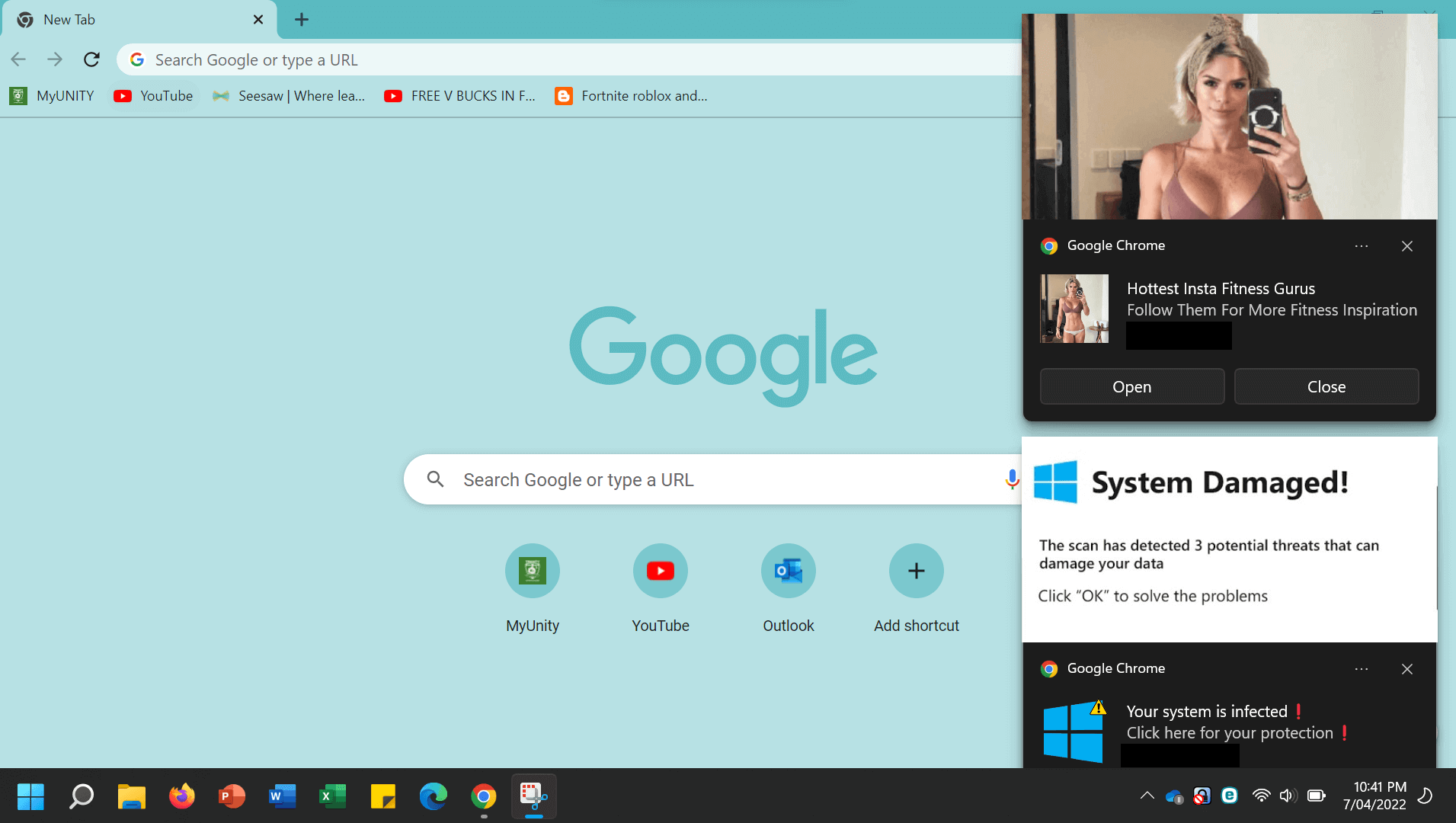
- Scares the victim with fake security warnings that their computer or device is infected
- Engages the victim with clickbait such as outrageous news stories with sensational headlines
What’s the end goal?
These ads serve various purposes. Some may be outright malicious. Also known as malvertising, a click on this kind of ad will exploit browser/software vulnerabilities or trick you into unwittingly installing malware via an app download. Others are designed to persuade you into handing over personal information via prize giveaways, questionnaires and other phishing-style pages. This could subsequently be used to commit identity fraud.
Another category of scam ads will target your finances more directly. They may ask for money to invest in a fictitious scheme, pay for a non-existent product, or hand over money to pay a fake fee, for example. In some cases, the scam ad may take you to a fake e-commerce site which covertly harvests your card details.
While these efforts are often digital, beware too of calling phone numbers on ads. They might put you through to a scam call center where the operatives will be trained to relieve you of your money and/or personal/financial information. This is often what happens if you get swindled by a fake security alert.
Banks hate these scams because, in jurisdictions like the UK, they are responsible for reimbursing customers for “authorized push payment” (APP) losses in some instances. They have long argued that social media platforms in particular should do more to police this content, and to compensate victims. However, in the US and elsewhere, social media companies aren’t legally bound to do so, despite profiting from the ad revenue.
This may change, of course, depending on the outcome of the FTC’s rulemaking, which is at its earliest stage. It says it may consider forcing platforms to vet advertisers, monitor posted ads, investigate scams, remove fraudulent advertising, and pursue disciplinary action, among other measures.

Scam-ad red flags: what to look out for
In the meantime, the best you can do is to spot the warning signs of a scam and steer well clear of suspect ads. You should be able to spot them by looking out for a few common red flags that include:
- Urgent language encouraging you to act quickly. This rushes us into making decisions that otherwise we may not make, like sharing our personal information.
- Too-good-to-be-true offers that trigger our fear of missing out. These are often presented as time-sensitive in order to ramp up the urgency.
- Any requests for sensitive personal information, which could help fraudsters build a profile of us with which to use for identity fraud. It could be details as innocuous as email/home address, phone number and full name.
- Phone numbers on ads that will probably route you to a scam call center. Most legitimate companies funnel support issues through digital channels initially.
- Pressure to download software in order to fix an ‘issue’ with your computer/device.
- Sensational news designed to tantalize and persuade you to click through.
- Celebrity endorsements for products and services for sale (sometimes deepfaked), or investment opportunities.
What happens if I’ve fallen victim to a scam ad?
If you’ve clicked through on a scam ad or called the number, and then downloaded something, handed over some personal/financial information, used your card to buy something, or made a bank transfer, don’t panic. Also:
- Don’t reply to any further messages from the scammer and monitor your accounts for suspicious activity.
- If relevant, contact your bank or card provider immediately and tell them what happened. They should be able to freeze your card or account while they investigate. If you’ve made a transfer, it will fall under an APP fraud claim. Card payments may be eligible for a chargeback.
- If you’ve handed over passwords, change them immediately on the relevant site and anywhere else you’ve reused them. Switch on two-factor authentication (2FA) for these sites and consider using a password manager to store strong, unique credentials for every account.
- If you’ve downloaded anything, run a scan using security software from a reputable provider. And ensure your operating system and all applications are all up to date.
- Preserve evidence of the scam where possible. This includes the ad itself, and any URLs, screenshots, emails/messages, payment records or correspondence with the scammer. It will help if you’re able to proceed with a reimbursement claim.
- Report the ad to the platform that showed it, using its built-in reporting option, and report the scam to the authorities, e.g. the FTC (US) or Report Fraud (UK).
Scam ads are getting easier to generate thanks to AI, and can look increasingly professional, even including video content. That puts more pressure on you to spot the warning signs. Stay safe.
Frequently asked questions (FAQs)
Why are there so many scam ads on Facebook and Instagram?
Scammers place them there to get maximum exposure, knowing the platforms don’t police their content rigorously. They may want your personal/financial information, or to trick you into buying a non-existent product. They may even want to con you into a fake investment.
How can I tell if an ad is a scam?
It might use urgent language and too-good-to-be-true offers, potentially endorsed by celebrities. It may ask for sensitive personal information, or feature phone numbers that take you to a call center where operatives will ask for the same details or urge you to download remote access software. It might claim your PC is infected with malware and pressure you into taking action. It could even deliver sensational news designed to encourage click throughs.
Can I get my money back if I paid through a scam ad?
Social media companies are not required by law to compensate users that may have been defrauded. But depending on where you live you may be able to file an APP claim with your bank. If you’ve made a card payment, you may be able to file a chargeback claim.
What should I do if I’ve fallen victim to a scam ad?
Don’t panic. Preserve the evidence and stop any communication with the scammer. Monitor your accounts for suspicious activity. Change any passwords you’ve shared and switch on 2FA. Contact your bank or card provider, tell them what happened, and ask them to freeze your bank account/card. If you’ve downloaded anything, run a security scan and ensure your operating system and software are all up to date. Report the ad to the platform and the scam to the authorities.