For all our modern obsession with social media and messaging apps, email remains a daily staple for many of us. Modern email providers are pretty good at filtering out unsolicited messages known as spam, their checks don’t necessarily work all the time. Much like with unwanted phone calls, sometimes it can feel like the internet gods have opened the floodgates as your inbox suddenly fills up with unwanted and malicious messages.
When it happens, the deluge can come without warning. But why? And what you can do about it?
10 reasons your inbox is full of spam and/or scams
Email spam can range from pesky, unsolicited missives sent in bulk to the downright dangerous and malicious (phishing messages and malware delivered via spam and also known as ‘malspam’). Here’s how you might end up with a sudden influx:
Data breaches and leaks
The cybercrime economy is a vast and complex entity in which individual participants usually perform a specialized role in the pursuit of wealth. Some might focus on breaching organizations in order to steal large volumes of customer data, including email addresses and personally identifiable information (PII). They then post or sell that data on cybercrime forums/marketplaces, where others buy it for use in phishing emails. They may impersonate the company that’s just been breached, citing your PII and account info to encourage you to believe their story. The end goal is usually to steal your logins or financial information, or trick you into installing malware.
A surge in spam probably means a batch of email addresses including your own has just been released on the cybercrime underground. Alternatively, a company may have accidentally leaked the information into the public domain, allowing nefarious actors to profit from.
Scam kit updates
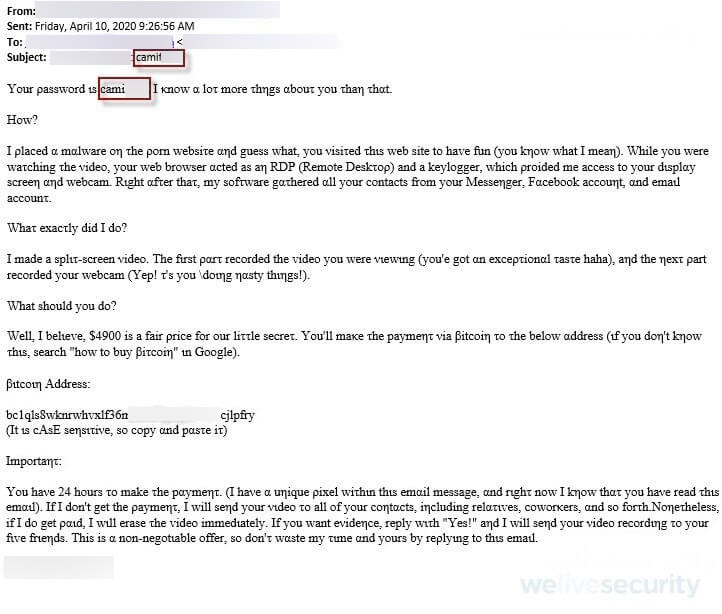
Today’s fraudsters have much of the heavy lifting already done for them, thanks to pre-packaged scam/phishing kits that handle everything from brand spoofing to obfuscation, phishing lures and possibly even multi-factor authentication bypass. Innovation is fast paced, with developers of these kits looking to add new features all the time to outwit security vendors and email providers. If they manage to achieve a breakthrough that bypasses spam filters, expect unwanted messages to start flooding in.
Selective spamming
Sometimes scammers focus their efforts on particular groups, such as employees of a specific company or users of a particular service (e.g., Netflix). That may be because they’ve got the data from a breach at one of these companies, or because they’ve scraped the data from specific sites.
Seasonal events
Phishing campaigns often use current events to improve success rates. Things like celebrity deaths and major emergencies and health crises, such as COVID-19, are typical fare. But seasonal spikes in spam can also come just before Christmas, or when consumers are filing their taxes, for example.
The power of AI
AI tools enable fraudsters to scale phishing campaigns with highly convincing messages designed to bypass spam filters. AI can also help with reconnaissance, to find your email address from publicly available sources which may otherwise be hard to unearth.
Public web scraping
Spammers don’t just source their email lists from large-scale data breaches. Some of them get hold of these details by using bots to scrape public-facing websites like social media platforms. Bad bot traffic accounts for 37% of all internet traffic. If your details were in the public domain, they may have been caught up in such a campaign.
You clicked through on a spam message
Spammers work like regular marketers. They might often end up with large email lists which they then have to whittle down to improve the ROI of campaigns. So if you click on a spam message or, even worse, reply, the sender will know that it is “live”, potentially leading to a new influx of messages.
Email bombing
If your inbox is suddenly brimming with unwanted messages, it may be a distraction tactic designed to bury an important message – say, a security alert from your bank or a notification of a purchase you didn’t make. The scammer will sign you up to potentially hundreds of newsletters or websites to inundate your inbox and hide that one crucial message.
Online shopping
During birthdays or before festive periods, you might go on a shopping spree. Some merchants may try and capitalize on this busy period by hiding marketing signups. Forget to uncheck/check them and you may get a deluge of annoying spam from the brands you bought from.
Reset settings
Say, your email security tool works by using AI to learn what suspicious activity looks like and you start fiddling with your settings and reset these, and it may wipe all that learned behavior.
How to stem the tide
Here’s how to hit back at the spammers and keep potentially dangerous scams out of your inbox:
- Keep social media accounts private to avoid web scraping bots harvesting your email address.
- Be phishing aware: never click on or reply to unsolicited emails. If you must, verify with the alleged sender by searching for their contact details separately (i.e., not by using ones on the email).
- Use “hide my email” or similar masking services when signing up to new services, to reduce the risk associated with data breaches.
- Some identity protection products and services such as HaveIBeenPwned can scour the dark web for your details to see if they have already been breached and/or alert you when any PII appears on the dark web. This will provide advanced warning about possible spam surges.
- Security software from a reputable vendor includes anti-phishing and anti-spam features that can minimize the volume of unwanted communications in your inbox. The best providers will offer multi-layered protection against even the most sophisticated phishing techniques, AI tools and scam kits.
- Consider unticking marketing opt-ins when shopping to minimize the volume of ‘friendly’ spam in your inbox.
What not to do
It’s also best practice never to:
- Avoid clicking on ‘unsubscribe’ or replying to a spam email, as this will verify your address to the sender.
- Open any attachments in phishing emails, as they may be booby-trapped with malware.
- Hand over more personal/financial information and logins in response to an unsolicited email, even if it looks genuine.
- Use your main email address for signing up to get freebies or public Wi-Fi.
- Save your details (including email, home address and payment cards) after purchasing, as these could be weaponized if the company is breached.
- Reset your email security settings or lower spam ‘sensitivity’ levels.
As with much of cybersecurity, the email threat landscape is a never-ending arms race between attackers and defenders. Arm yourself with these best practices, and effective third-party security tools, and you stand the best chance of keeping your inbox free from sudden surges in spam.