Familiarity might breed contempt. But in the world of cybersecurity, it also breeds complacency, which can be a lot more dangerous. So it is with QR codes, which have become a common sight on menus, lampposts and parking meters – and, increasingly, in emails over recent years. The challenge is that they’re also a great way to disguise malicious links, bypass some traditional corporate security filters, and to move the interaction from a corporate computer to a personal phone with fewer security controls.
Attackers will continue to experiment and innovate with new ways to avoid detection. And new “quishing” techniques to snare unwitting employees. Here’s what you need to understand to keep your organization safe.
Why is quishing so dangerous?
Short for ‘Quick Response’, a QR code is a two-dimensional barcode that can encode URLs, payment details, contact information and other data, helping users get quickly from A to B – the destination in this case usually being a website or app. They appeal to threat actors for several reasons. Their widespread use, accelerated by the demand for contactless interactions during the pandemic, has made scanning them an ordinary part of daily life. That means we’re more likely to get our phones out to scan them today than a few years back.
They also slot neatly into phishing workflows – just replace that malicious link or attachment with a QR code. And they can be generated in seconds. In fact, many phishing kits will have a dedicated QR-code generator. Most importantly, they take the victim from a relatively well-protected corporate environment to a potentially unmanaged mobile device, thus bypassing business-grade security.
One important advantage for the attacker is concealment. The destination is encoded in a visual pattern, not displayed as readable text, which hides the malicious URLs behind them so that some traditional email filters can’t extract and inspect them. Sometimes they’re further obfuscated by being embedded in PDF or JPEG attachments. That means they’re more likely to end up in your employees’ inboxes. And when they do, your staff may struggle to discern a real message from a malicious one. There’s typically not much text to analyze for typos or grammatical mistakes. And because the link is effectively encoded in a visual pattern, it’s invisible to the human eye.
If used in conjunction with a trusted brand – say, a DocuSign email or an update from Microsoft – the quishing attack leverages similar social engineering tactics as classic phishing messages. Trusted branding reassures the victim that they can click through. And a sense of urgency is often created by the pretext. Malicious QR codes are frequently embedded in alerts urging users to secure their account, or authenticate to confirm their details.
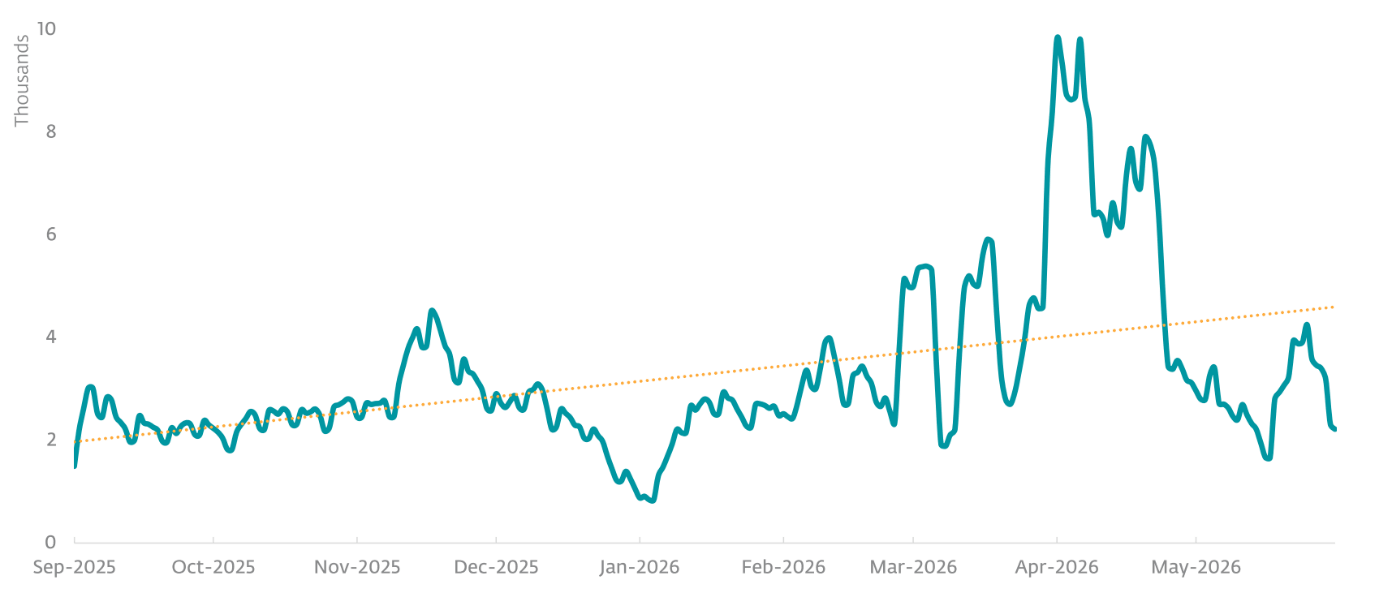
In fact, according to the ESET Threat Report H1 2026, malicious QR codes were embedded in no fewer than 11 percent of all phishing email in the first half of 2026. “ESET tracks quishing emails under the detection name QRCode/Phishing. This detection works through a dedicated layer of the ESET email scanner, designed to identify QR codes in the vast majority of file types, and to decode the URLs in them. The extracted URLs are scanned using ESET anti-phishing, anti-malware, and anti-spam engines; any harmful URLs are blocked, and the associated emails flagged or deleted,” says the report.
Threat actors continue to innovate
As with any threat landscape trend, malicious actors continue to hone their efforts for maximum impact. Quishing attacks are being used not only to install malware and steal credentials but also harvest MFA tokens. Security researchers have also seen them in attacks designed to:
- Bypass app store security through direct app downloads where malware is disguised as legitimate apps
- Take the user not to a malicious/phishing website but link directly to a legitimate social media, payment or other app. This could be used in various scenarios such as:
- Account takeover, where the victim is directed to authenticate the attacker in their account
- Financial fraud, where the victim is directed to a payment app with pre-filled payee information
- Contact/calendar poisoning, where malicious meeting links or new contact information are embedded in utility apps and redirect users to phishing sites when clicked on
- Malicious Wi-Fi, which the victim is automatically connected to a threat actor’s rogue access point
- Obfuscate security tools by using QR code shorteners, which convert long, malicious web addresses to small links and embed them in QR codes
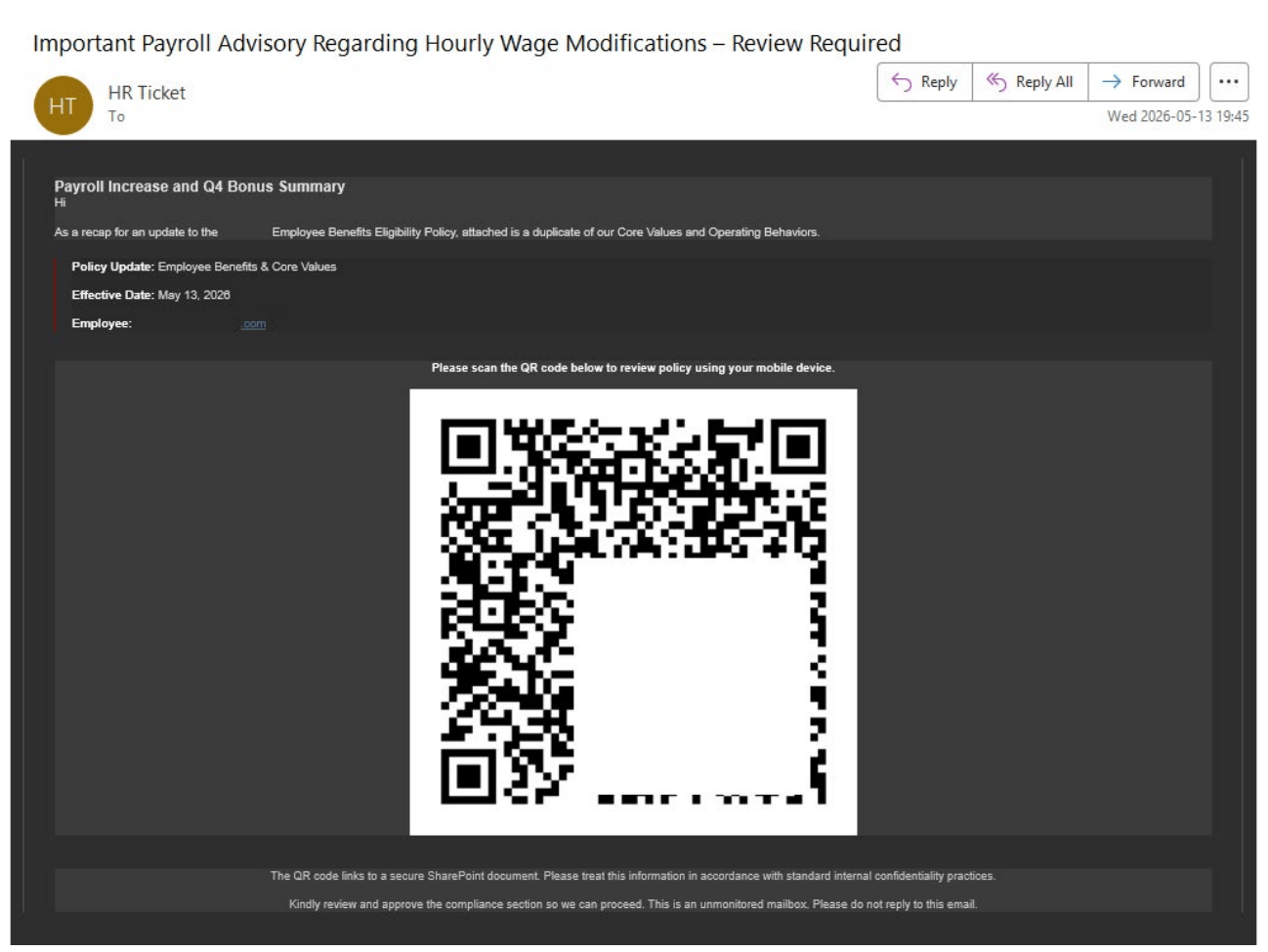
Even state-sponsored APT groups are using quishing as part of their tradecraft. An FBI notice from January 2026 warned that the North Korean Kimsuky outfit targeted think tanks, academic institutions, and US/foreign government entities with embedded QR codes in spearphishing emails. The lures varied. The emails in question variously claimed that scanning the code would lead users to questionnaires, registration landing pages, and secure drives.
Keeping your business safe from QR phishing
Fortunately, a well-judged blend of people, process and technology adjustments can help to greatly reduce the quishing risk to your organization.
Start with people. Build quishing into user awareness training courses and simulation exercises. Encourage employees to avoid scanning QR codes in unsolicited emails and report anything suspicious. If they believe it’s from a trusted source, they should check back with the sender, using contact details sourced separately from the email.
Next, consider technical controls, including email security from a reputable vendor to minimize the risk of quishing emails ending up in users’ inboxes. Add a mobile security solution to employee devices to block access to malicious sites and other threats. And require phishing-resistant multi-factor authentication (MFA) on all sensitive accounts, so that even if users are tricked, adversaries won’t be able to gain a foothold into corporate systems. Mobile device management (MDM) tools can help you to ensure all devices are protected in line with corporate policy.
Reduce the attack surface, enforce least privilege and just-in-time access. Keep all mobile operating systems and corporate software up to date – including your security tools. And conduct continuous monitoring for suspicious activity. Practice incident response plans in the event of a worst-case scenario.
A novelty no more
QR codes have evolved from something of a novelty to a regular sight in the enterprise. And so has quishing. Familiarity need not breed complacency. Just as staff have grown used to being suspicious of traditional email and SMS-based phishing, they can be trained to spot the warnings signs of a possible quishing attempt. Under the right circumstances, familiarity can build security.